Released in May 2019, the Panasonic Lumix S1H revolutionized the world of videomakers by offering cinematic-level video quality. It was the world's first full-frame mirrorless camera to allow 6K video recording at 24p in a 3:2 aspect ratio
Designed more for professionals than amateurs, this Lumix S1H has incredible video capabilities, starting with an amazing dynamic range of +14 STOPS thanks also to the V-Log/V-Gamut function. It was also "certified" by Netflix as a "primary camera" for its content, a sign that Panasonic managed to deliver a truly top-tier product.
In recent weeks Camera Nation had the opportunity to thoroughly test it, putting it through its paces both in photography and cinematography, in any lighting condition. We tell you in detail how we found it.
ERGONOMICS
The Lumix S1H is a mirrorless camera but it looks very much like an old-school DSLR. The dimensions are significant (151 x 114.2 x 110.4 mm) and the weight is not for everyone either.
The camera body alone weighs 1052 grams with the battery included. We tested it in recent weeks with a Lumix S PRO 24-70 f/2.8 lens that weighs a hefty 935 grams. A combination weighing a full 2Kg, a decidedly heavy weight not suitable for everyday photography.
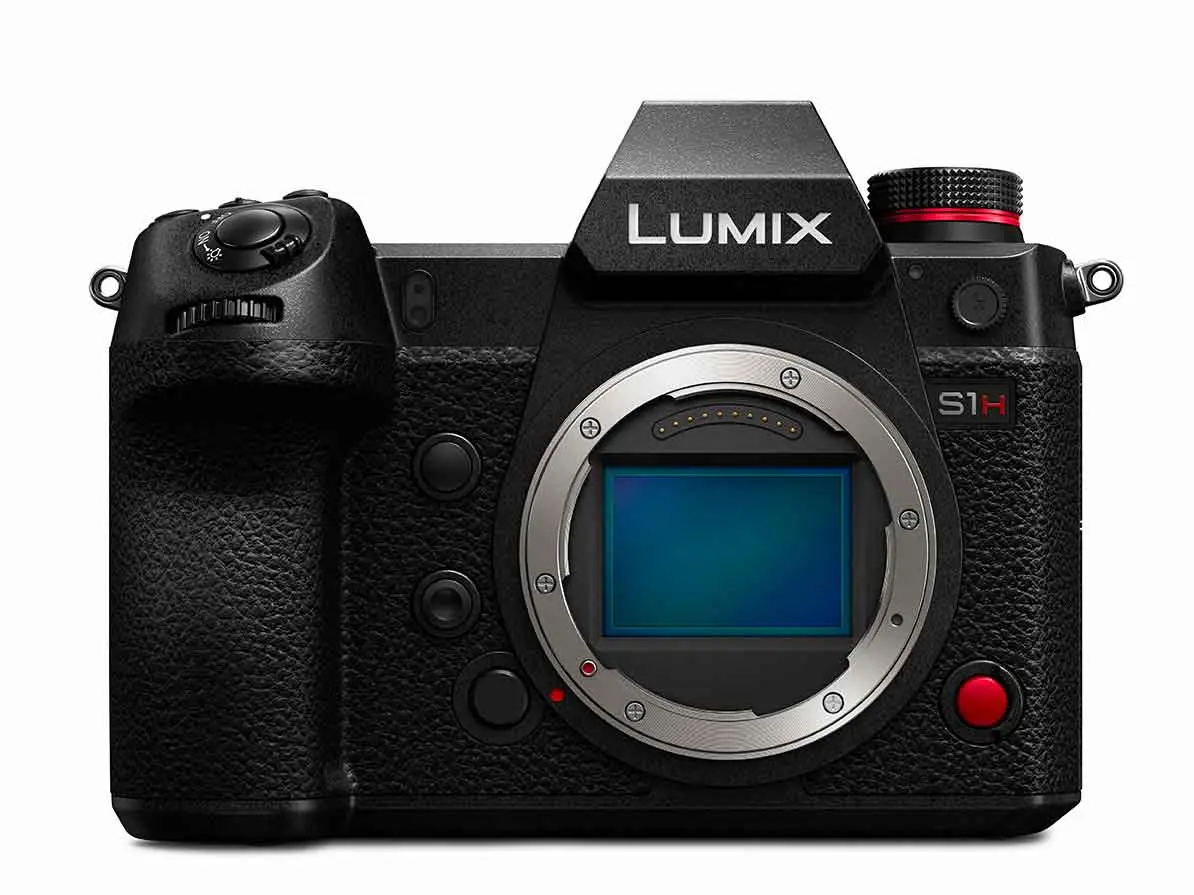
Despite the significant weight and bulk, the Lumix S1H has a firm and well-made grip. Most of the buttons, many of which are fully customizable, are easily reachable without having to remove or shift your hand from the grip.
The only slightly awkward button to press is the video recording button, placed between the thumb and index finger of the right hand. However, this is a minor issue since there is a second video recording start button located next to the lens, reachable with the left hand.
A small "touch" from Panasonic is having colored these buttons red to differentiate them from the photo shutter button.
There are many buttons on this camera that allow the photographer to change settings in just a few "clicks" without having to enter the dedicated menu.
On the top of the Lumix S1H, besides the mode selection dial and the shutter button, we find 3 other buttons to set white balance, ISO value, and exposure compensation.
There are also 2 additional dials to modify settings within the menus (such as ISO values, apertures, and shutter speeds). Also interesting is the dial that allows switching with one "click" from single shot to multiple shot or to self-timer mode or to "timelapse" mode, a feature usually found within the menus and not directly on the camera body.
On the front, besides the video recording start button mentioned above, there are 2 customizable buttons operable with the middle or ring finger of the right hand.
But it is on the back that we find an abundance of features. Besides the classic buttons to directly access the menu, to view photos and videos, and to delete content, there is a joystick multifunction, we also find an interesting selector that allows switching instantly from single autofocus mode to continuous focus, or to manual focus.
Last but not least, an interesting button is the "LOCK" button which allows locking buttons, dials, the touchscreen, and joystick. It was very useful to us on the night of San Lorenzo during a night photography session searching for shooting stars. This button allowed us, once the right settings were found, to "lock" them without the risk of touching the camera in the dark and accidentally changing something.
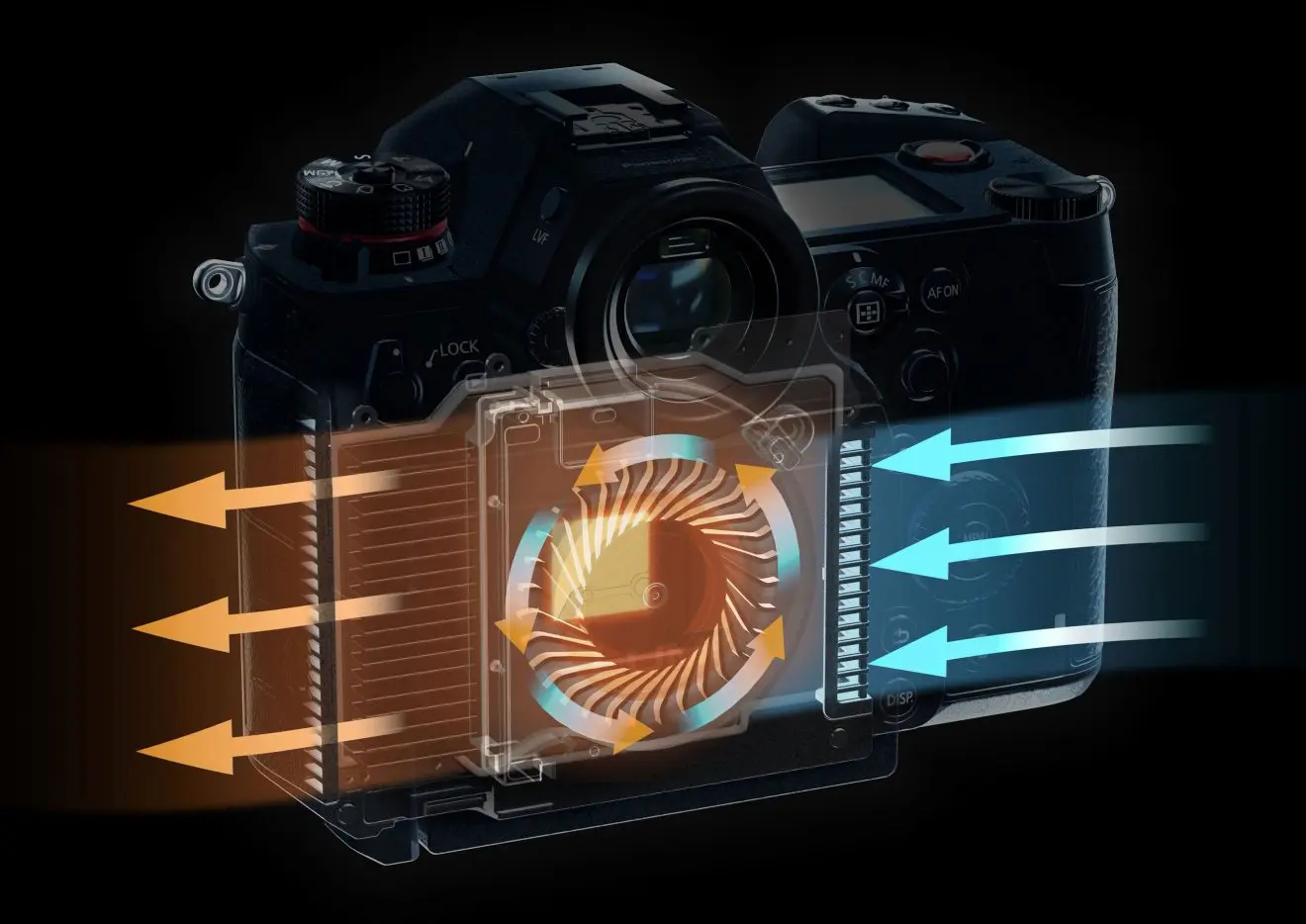
There are 2 other big innovations on the back of this amazing Lumix S1H. One can be seen even without touching the camera and it is the cooling fan. Yes, you read that right, nothing like this had ever been seen on a camera before but to achieve stable and continuous video recording, heat dissipation is an essential aspect.
Panasonic has designed a cooling fan in an innovative structure exclusively for the LUMIX S1H, which efficiently dissipates heat to support the S1H's unlimited video recording capability.
During all our tests, we NEVER heard the fan noise, which is truly imperceptible. It is indeed somewhat bulky, protruding almost 1 cm, but in this case Panasonic prioritized substance over form since even after 1 hour of 6K video recording, we had no overheating issues, unlike many other manufacturers.
Directly above the cooling fan, Panasonic has placed a 3.2-inch touchscreen display fully articulating and definitely flexible. Since rotating the display could cause issues with the ports located on the left side of the camera, Panasonic decided to add an additional hinge that allows the display to be extended further out and used in any situation. In the photos below, you can see the possible "bulk" and the solution.
On the left side of the Lumix S1H, we find an HDMI port, a USB-C port, a headphone jack, and a microphone jack.
On the right side, there are 2 slots for SD/SDHC/SDXC cards with support up to UHS II.
The high-capacity 7.4 V 3,050 mAh battery allows for long recording autonomy of about 2 hours in all recording modes. The battery can be quickly charged via USB PD (USB Power Delivery) using the included USB 3.1 Type-C cable, which also provides high-speed data transfer.
USER MENU
As already mentioned above, Panasonic has included so many buttons (many of which are customizable) and dials on this S1H that during our entire test we rarely had to enter the menu to change settings.
The menu, however, is extremely intuitive and is designed with 2 cascading levels. The icons on the far left are the main ones; selecting one (either with the joystick or the touchscreen) will change the icons in the 2nd row, which are the ones that will then display the menus on the right, as you can see from this image:
A very interesting feature that we see for the first time on a mirrorless camera in this class is the presence of a special video menu during recording.
The Lumix S1H introduces a new display option to monitor and manage settings during video recording, consolidating all important functions into a single screen.
Basic settings such as frame rate, shutter, aperture, ISO, dynamic range, and white balance occupy the panels at the top and bottom of the screen, and a quick tap on the screen is all it takes to make adjustments.
The central section of the screen includes other interesting information, including audio settings and live indicators, card status, fan settings, codec, and some other items. As with the basic settings, a simple tap on the screen is enough to change them instantly.
This is essentially the same interface used on Panasonic's professional camcorders like the Varicam or EVA1, so anyone integrating the S1H into a production alongside those cameras should feel right at home. We haven't had the pleasure of testing professional camcorders, but we really liked this video menu and found it very useful during shooting.
AUTOFOCUS AND PERFORMANCE
Autofocus has always been Panasonic's Achilles' heel. Although greatly improved compared to the previous S1, we also found on this S1H slowness and inaccuracy, in any lighting condition.
Both in photography with continuous autofocus and in video, the autofocus is too slow compared to the competition and the automatic face recognition often fails by focusing on something else, which is definitely not pleasant.
Performance, on the other hand, are TOP-notch, also thanks to the cooling fan we mentioned earlier. We recorded 6K video for 20-25 minutes and the camera didn't bat an eye, staying cool at all times and without the overheating issues that we instead found in many high-end cameras from other brands.
The burst shooting speed of the Lumix S1H reaches 6 FPS (40 RAW files or 50 JPG) if autofocus is used, or 9 fps if it is not used.
There is also news regarding the battery, which has been upgraded to 7.4V 3,050 mAh and which allowed us to shoot and record all day long. Without flash, you can easily take almost 500 images.
The only limitation remains the memory cards; 6K footage takes up an enormous amount of space and even the camera's RAW files reach almost 40 megabytes each. With a photo/video camera like this, you always need several SD cards in your backpack.
IMAGE QUALITY
Although primarily designed as a video camera, the Lumix S1H also performs very well in photography and achieves excellent final image quality.
Clearly, the lens used also has a big impact. In our case, we used a wonderful LUMIX S PRO 24-70 mm F2.8 (S-E2470) lens.
The Lumix S1H, like many other cameras, allows you to choose the type of photography to shoot and also allows modification of some parameters depending on the photographer's style. We opted for a "custom" style and increased both the contrast and the color saturation to test the quality of these two features.
The colors of the images we took are nicely saturated and the camera performed optimally in any lighting condition.
The internal 5-axis stabilizer, combined with the lens stabilizer, allowed us to shoot handheld at relatively slow shutter speeds without any blur.
The dynamic range is also impressive, declared by Panasonic at +14 STOPS, which allowed us to capture images with very different light intensities without any problem.
We obviously also tested ISO performance, shooting during the blue hour around 10 PM, noting that the Lumix S1H can comfortably be used at 12800 ISO without major issues of "digital noise."
In the comparison you see below, you can notice the difference between the various ISO sensitivities
Zooming in on the mountain in the background (photo below) you can see slight digital noise at 12800 ISO but it is perfectly usable. At 65000 ISO, obviously the noise becomes excessive but it still allowed us to shoot at 1/250 of a second practically in the dark. We had a tripod, but with this shutter speed we could have easily shot handheld.
The advice we feel like giving is to always try to get the shot; if needed, increase the ISO without hesitation. Better a noisy photo than a blurry one.
Another interesting new feature added to this Lumix S1H from a photographic point of view (although in reality it will ultimately become a video) is the ability to make some timelapse without using external intervalometers that take photos every set number of seconds.
Through the dial located on the upper left side of the camera, you can select the timelapse mode which will allow you to set the number of photos to take, the interval between each photo, and even the start time for the shooting session. The camera will automatically calculate how long the entire photo session will last and will indicate (before starting) the end time and the duration of our final video.
The video is assembled directly in-camera, which will first ask us in which format we want to create the final timelapse.
Below you can see 2 timelapses edited from about 400 images taken over the course of half an hour... we even managed to capture several shooting stars on the night of San Lorenzo.
\n
\n
VIDEO QUALITY
We've already said it but we want to repeat it: this camera is primarily designed for video and to meet most of the needs of videomakers.
Videos can be recorded in dozens of different formats, perhaps too many for a less experienced user. At the highest resolution, it can record in 6K at 24p 10-bit in 3:2 format, perhaps not very usable but excellent if you want to crop in post-production since the resolution is really high.
If you prefer the classic 16:9, you have to go down to 5.9K 30/25/24p to reach up to 4K 30p 10-bit or FHD at various frame rates, including slow motion at 120fps.
Among other things, on the Lumix S1H we also find support for anamorphic format, the first in the world on a camera of this class also approved by Netflix.
A feature that distinguishes this video camera is the presence of V-LOG and V-GAMUT which bring the dynamic range to a remarkable +14 STOPS, impressive. V-GAMUT also covers the entire HDR color spectrum.
Another video feature we absolutely appreciated is the dual native ISO, a feature present on the Varicam cinema range from a completely different world. This dual native ISO technology proved very useful to us during low-light shooting, especially in shots where you switch from a lit scene to one that is practically dark, or almost so.
This technology allows a completely automatic switch from a standard sensitivity (used in bright light) to a high one (darkness), managing to contain the noise increase without any problem.
We have already said this before but we repeat it: the only real flaw (not a novelty) that Panasonic will have to work on in the future is the autofocus, which is very slow and inaccurate compared to all competitors. We especially refer to continuous autofocus or face recognition autofocus. If people are moving, there is a high risk that this autofocus will not work as it should. If you do not use these types of autofocus and only focus manually, then you can disregard this flaw.
CONCLUSIONS
The Panasonic Lumix S1H is definitely not a camera for everyoneand is aimed at a professional market, also considering its exorbitant price of 4000 euros for the body only.
If you are looking for a practical, affordable camera that just takes beautiful photos, this is not the camera for you. You can take beautiful photos with many other cameras as well.
Buying a camera like this only makes sense if you are a professional in the video editing world (or aspire to become one). From this point of view, the Lumix S1H is exceptional, almost unbeatable, offering you almost everything you need to capture truly professional quality video.
The S1H offers many professional-level video capture capabilities in a small and relatively affordable package. If you are an expert in videomaking, you will be well aware of the costs related to purchasing a professional cinema camera. This S1H comes very close to the performance of those cameras but at a much more accessible price, so if you are an ambitious director or have an independent production team, this is the camera for you.
Also take a look at our video review made by Simone on the new Camera Nation YouTube channel and please... subscribe to the channel to stay always updated!!!
\n