If we talk about photography, we cannot avoid talking about post-production and what better software than Photoshop? This software created by Adobe is by far the most used photo editing software in the world but unfortunately it is not free and also requires quite a lot of computer resources, two things that do not worry professionals but could cause problems for amateurs.
This is why Adobe also thought about this by creating a version of Photoshop free online accessible directly from a browser without having to install anything on the computer (except Adobe Flash) and without having to spend 1 euro. You just need a computer connected to the internet and you're all set.
Clearly the version of Photoshop free has significant limitations compared to the paid version but for a simple amateur who wants to quickly edit an image it is more than sufficient. In this article, we will therefore see how to use Photoshop online step by step.
Photoshop online free
The online version of the world's greatest photo editing software is called Photoshop Express Editor and it can be used for free by clicking on this link.
If Adobe Flash Player is not installed on your PC, Adobe Flash Player you will be asked to download and install it, unfortunately it is the only requirement needed to use Photoshop online. A screen like the one below will appear. If you don't see it, even better, it means Flash Player is already installed on your PC.
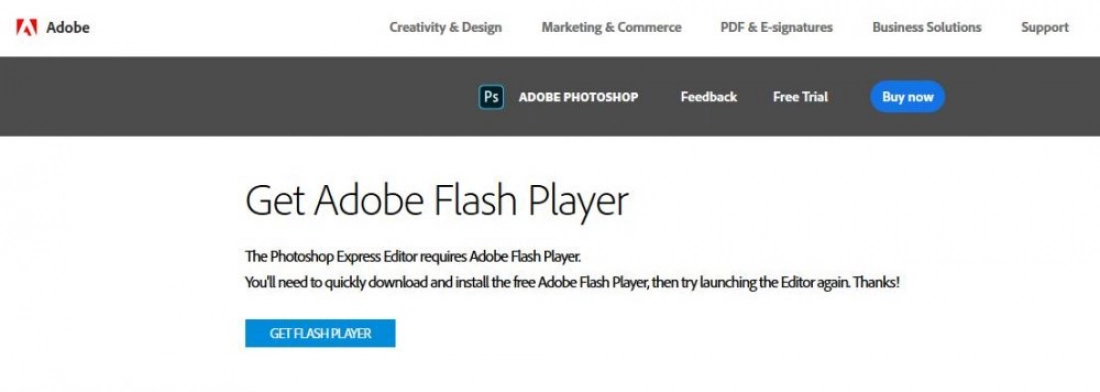
Click on "get flash player" and once the download is complete, run the downloaded executable. After installation, you are ready to use Photoshop online free always clicking on this link.
First of all, a very simple screen will appear where you need to click the "upload photo" button, select the image you want to edit, and complete the upload. One of the major limitations of this free editor is that you can only upload JPG images; it is not possible to work on raw RAW files.
After a few seconds of loading, you will find yourself facing a very simple but intuitive free online Photoshop screen, with the (very limited) tools on the left and your image in the center ready to be edited. Here is how the interface looks once the image is loaded:
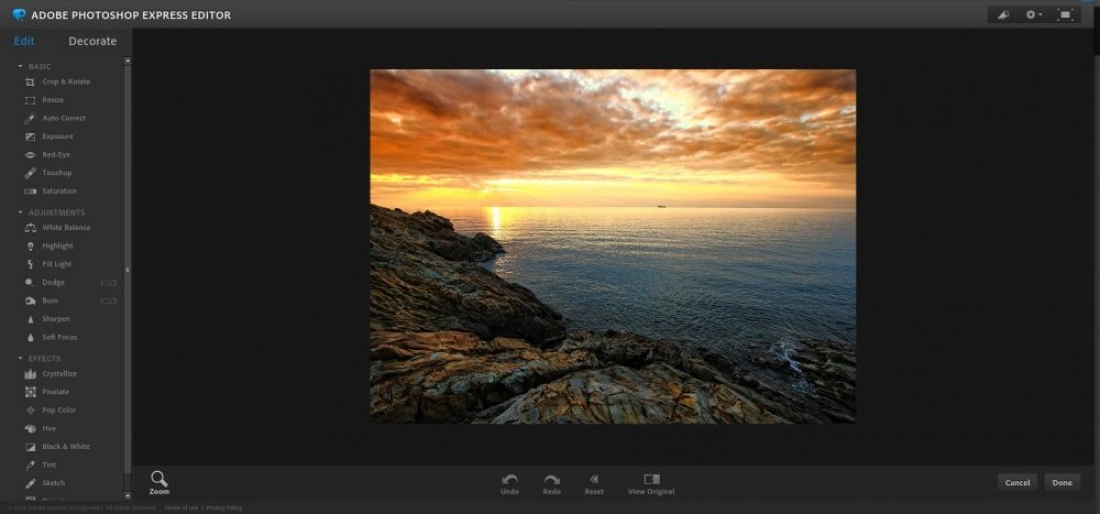
The tools you will find on the left are divided into 3 sections: basic, adjustments, and effects.
In the "basic" section you find basic tools such as cropping, resizing, rotation, exposure correction, saturation adjustment, and the ability to remove red-eye effect.
In the "Adjustments" there are tools for white balance correction, highlight and shadow management, and sharpness control.
Last but not least, the "effects" section where you can apply special effects to the entire image, including black and white and other very strange and rarely used effects.
Each time you select a tool, you will have the option to adjust the intensity level and automatically see a preview of the change directly on the image, very useful to avoid continuous trial and error.
Below the image there are also some very useful buttons including "undo" to go back if you made a mistake, "reset" to start over, and "view original" to split the screen and see half the original image and the other half edited.
Once you finish the edits, just click the "Done" button to save the new image to your PC.
Although very limited in tools, the editor of Photoshop online allows anyone to perform basic edits on JPG images. This tool is certainly not what a professional needs, but for the casual amateur it can be a very interesting free tool.
Another small limitation of this online Photoshop is the possibility to use it only in English. Free online Photoshop in Italian is currently not available on the web, but we can assure you that the English version is very simple and easy to use. Even if you don't know the language, after a few tries you will realize that the tools are simple and intuitive.
All that's left is to try using free online Photoshop, we look forward to hearing how it went. Happy post-production!!!
P.S. But don't forget to first follow the online Photoshop course completely free.